Bring first-person capture into your VLM pipeline.Bring egocentric capture into your VLM pipeline.
From real capture and time alignment to semantic annotation. First verify the E2 / E6 samples and fields, then evaluate training, evaluation, and delivery scope against the target task.From real capture and time alignment to semantic annotation. Inspect E2 / E6 samples and fields, then scope training, evaluation and delivery for your task.
Public samples are verifiable · Source tiers are traceable · Scope of applicability confirmed per projectInspectable Samples · Traceable Provenance · Project-Scoped Adaptation
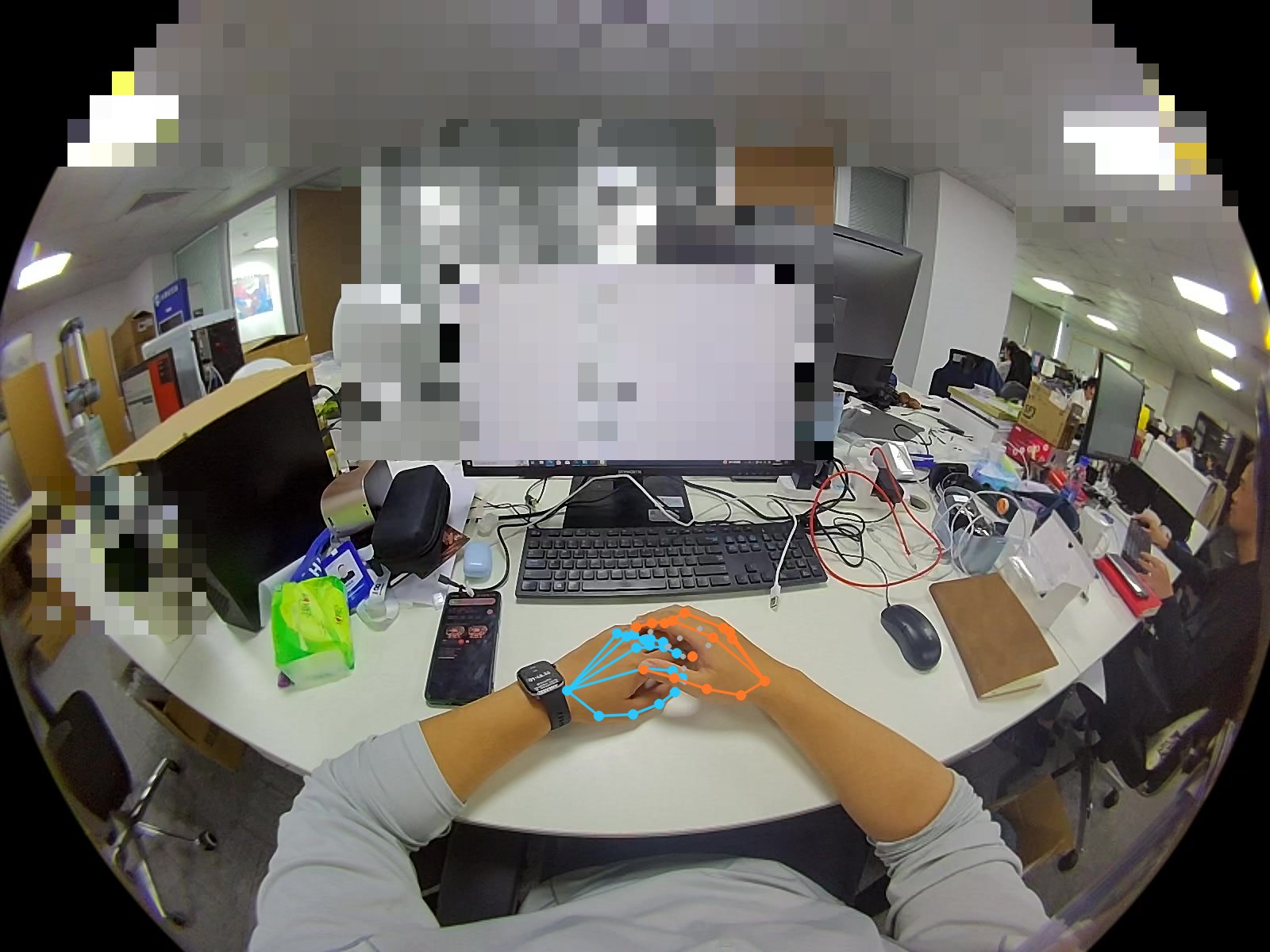
E2 · estimateLeft-eye sample. Cyan = left hand, orange = right hand, gray = confidence below 0.5. The screen has been redacted; the wearer's hands are retained.Left-eye sample. Cyan = left hand, orange = right hand, gray = confidence below 0.5. The screen is mosaicked; the wearer's hands remain.
TOBI · VLM DATA ENGINEERING
What does your model need to understand?What does your model need to understand?
Below is the project requirements entry point. The existing samples demonstrate basic observation and partial annotation; the full task set, adaptation, and performance evaluation require separate confirmation.These are project-scoping paths. Current samples show observations and selected annotations; full task datasets, adaptation, and model evaluation require confirmation.
01
Scenarios and Wearer Q&AScene & wearer QA
Distinguish who is operating, what is seen, and which questions cannot be answered.Identify who acts, what is visible, and which questions cannot be answered.
Temporal Localization and Step UnderstandingTemporal Grounding
Locate the start and end of the action; verify preceding and following states and step order.Locate action boundaries, before/after states and step order.
Time interval + step labelTime spans + step labels
Find clips by event; cross-session memory requires a new capture design.Retrieve clips by event; cross-session memory requires additional capture design.
Event index + query evidenceEvent Index + Query Evidence
First define the problem, scenario coverage, train/test split, and acceptance criteria.Agree on the task, scene coverage, train/test split, and acceptance criteria.
02
Real CaptureCapture
Raw footage / sensors / calibrationSource / sensors / calibration
Retain the original master, and record the device, session, calibration version, and the scope of available licensing rights.Preserve source media with device, session, calibration and permitted-use records.
03
Spatiotemporal alignmentAlign
Time index / valid intervalTime indexes / valid intervals
Distinguish clock offset from drift; check for dropped frames, gaps, units, and coordinate systems.Separate clock offset from drift; check dropped frames, gaps, units and coordinate frames.
Evaluate Q&A, motion ranges, and step labels based on the task; indicate whether the source is manual or model-generated.Scope QA, action spans and step labels by task; record human or model provenance.
Evaluated per project, with methodology and validity retained. Neither device algorithms nor offline estimates automatically equal ground truth.Evaluate per project, preserving method and validity. Device algorithms and offline estimates are not automatically ground truth.
Agree on model version, frame sampling, resolution, and budget; confirm compatibility after validation with actual loading.Agree on model version, sampling, resolution and budget; confirm compatibility only after a loading test.
07
Independent evaluationEvaluate
Frozen test set / failure analysisFrozen test set / failure analysis
Isolate data by personnel, site, and session. Accept QC reports and model performance separately.Separate people, locations, and sessions across splits. Validate data quality separately from model performance.
Deliver documents, source records, and quality reports according to the confirmed scope; new adaptations and evaluations require separate confirmation.Deliver agreed files, provenance and QC. Additional adaptation and evaluation require a scoped agreement.
Delivery begins with a review of tasks and fields. The real samples below can be used to verify current outputs; added supervision, model adaptation, and independent evaluation are not included in the default deliverables.Delivery starts with task and field review. Samples below document current outputs; new supervision, model adapters and independent evaluation are not included by default.
Source attribution: raw sensor data, on-device algorithms, offline estimates, and human annotation are recorded separately. OpenXR / SLAM are algorithm outputs and do not become ground truth merely because they are written by the device. All frequency, offset, and validity-rate figures describe only the corresponding public sample.Provenance distinguishes raw sensors, device algorithms, offline estimates and human annotation. Device-written OpenXR / SLAM is not ground truth. Rates, offsets and validity figures describe the specific public samples only.
E2 · estimate · 40.0–48.0 s · 4 HzLeft: raw left-eye frame. Right: SGBM + left-right consistency + confidence gating. Black blocks = low confidence / matching failure. Not a depth camera.Left: original Camera0. Right: SGBM + LR check + confidence gate. Black = low confidence. Not a depth camera.
The preview is for verification only. Training reads the Camera0 / Camera1 original footage at 1600×1200 @ 30 Hz. Effective pixel ratio is approximately 40%, with a median distance of approximately 1.34 m.Preview for checking only. Train on Camera0 / Camera1 at 1600×1200 @ 30 Hz. ~40% valid pixels, median distance ~1.34 m.
Interaction ExamplesInteractive sample
Annotation Workbench
Annotation workbench
Click a step or use the left/right arrow keys: both streams jump and play in sync, with audio from the original clip only. Player 0 seconds = recording 22 seconds. Boxes, masks, 6DoF, contact force, and joint confidence are empty.
Click a step or use the arrows: both players jump and play together; only raw stays audible. Player 0 s = record 22 s. Boxes, masks, 6DoF, contact force and joint confidence stay empty.
Page 1 / 6 stepsStep 1 / 6SourceSource22.00 sPreviewPreview0.00 s
Both hands in the desktop work area, gripping a dark handle. Left-hand tracking is not yet stable.
Both hands at the desk, gripping dark controllers. Left tracking is not stable yet.
Left hand validLeft active3%
Right Hand ValidRight active97%
Head pathHead path0.19m
Gyroscope RMSGyro RMS0.15rad/s
Right thumb–index fingerR thumb–index45mm
Thumb-to-index finger is joint geometric distance, not contact force. Box / mask / 6DoF / joint confidence are empty.
Thumb–index is joint geometry, not contact force. Boxes / masks / 6DoF / joint confidence remain empty.
E6 · 23.17–25.50
Looking at the desktop terminal
Facing the Terminal
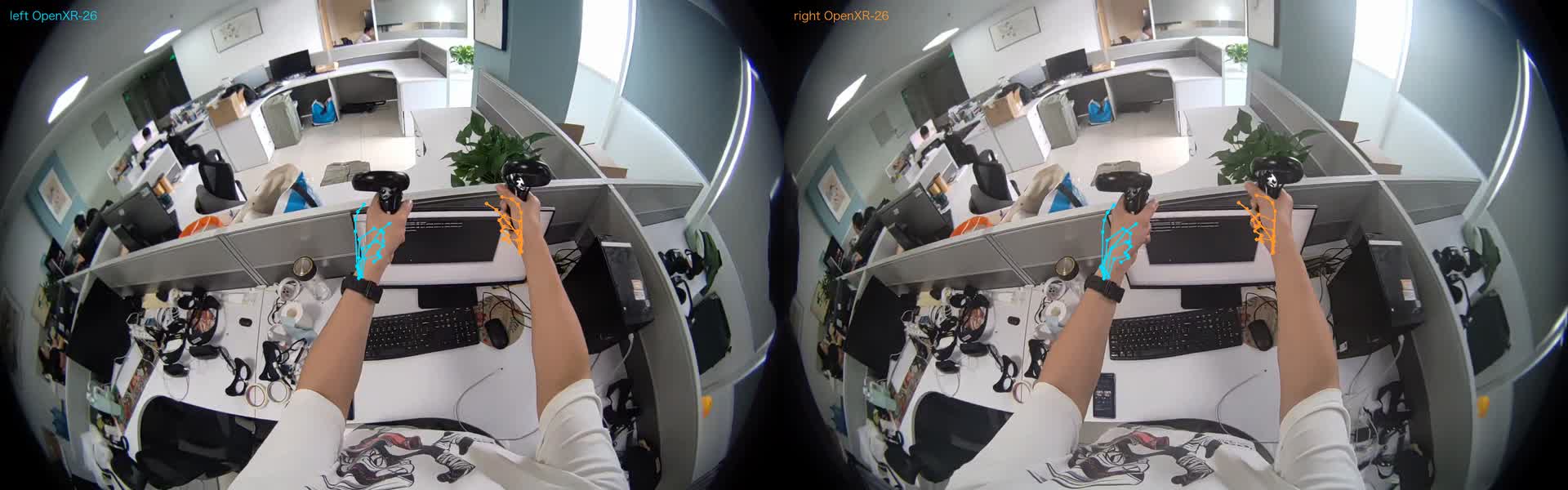
Both left and right hands are valid, still gripping a dark handle, looking at a desktop terminal.
Both hands stay active, still gripping the controllers and facing the terminal.
Both Hands SimultaneouslyBoth active92%
Left wrist pathL wrist path1.46m
Right wrist pathR wrist path1.52m
Gyroscope RMSGyro RMS0.67rad/s
Thumb–index fingerThumb–index73 / 56mm
Thumb–index: left 73 mm, right 56 mm. Not contact force.
Thumb–index: left 73 mm, right 56 mm. Not contact force.
E6 · 25.50–27.52
Paper Rolls and Fabric
Paper roll and cloth
Switch to paper rolls and fabric. The right hand is steadier; the left hand is intermittent. Objects are not boxed.
Hands move to a paper roll and cloth. Right is steadier; left comes and goes. No object boxes.
Left hand validLeft active47%
Right Hand ValidRight active98%
Head pathHead path0.53m
Right wrist pathR wrist path1.28m
E6 · 27.52–29.50
Continue with paper rolls and fabric
Still on paper and cloth
Both left and right hands are effective simultaneously; continue handling the paper roll and cloth. The head barely moves.
Both hands stay active on the paper and cloth. Head barely nets displacement.
Both Hands SimultaneouslyBoth active86%
Head pathHead path0.66m
Net head displacementHead net0.03m
Left wrist pathL wrist path1.70m
E6 · 29.50–31.20
Pinching a small part
Pinching a small part
Pinching a small part with both hands. Thumb is closer to the index finger. No object bounding box.
Both hands hold a small part. Thumb–index is closer. No object box.
Both Hands SimultaneouslyBoth active85%
Right thumb–index fingerR thumb–index24mm
24 mm is joint geometry, not gripping force.
24 mm is joint geometry, not grip force.
E6 · 31.20–endE6 · 31.20–end
Left Hand Holding Phone
Left hand holds a phone
Left hand holds the phone and looks at the screen. Right hand is valid 0%. The handle pose file is still a single line of zeros.
Left holds a phone and looks at the screen. Right active 0%. Controller-pose file is one zero row.
Left hand validLeft active100%
Right Hand ValidRight active0%
Head pathHead path0.05m
Left wrist pathL wrist path0.03m
Screen text was not redacted at the detection level.
Screen text is not detector-masked.
E2 · 20260917_133640
Post-Processing on Binocular Data
Estimates on stereo
11 minutes 22 seconds. The device only has left and right eyes, an IMU, a magnetometer, and 16 kHz stereo audio. The skeleton, mosaic, and top-right parallax are not device output. When played together, only the track you pressed sounds.
11 min 22 s. Device files are the two eyes, IMU, mag and 16 kHz stereo. Skeleton, mosaic and corner disparity are estimates. Only the player you press stays audible.
Full pipeline: real worn recording → depth-processed into trainable assets
One pipeline: worn capture → graded assets for training
Using TOBI's established naming: device → indexes → human → estimate. For procurement, tiers can be selected by depth; no undelivered capabilities are claimed. Samples are for field verification; actual delivery is subject to the project manifest.
Named with what TOBI already ships: device → indexes → human → estimate. Buyers pick depth; we do not claim undelivered layers. Use samples to inspect fields; the agreed manifest defines delivery.
D1 · DEVICE
Raw capture data
Source Data
Video and IMU / pose. Native frame rate original footage, calibration tied to serial number.
Video plus IMU / pose. Native-Hz source; calibration by serial.
E2 Binocular / E6 Multi-Stream RGB
IMU · Audio Offset
Camera intrinsic and extrinsic parameters
E2 stereo / E6 multi RGB
IMU · audio offset
Intrinsics / extrinsics
D2 · INDEXES
Basic alignment
Aligned base
Standardized structure, multimodal temporal alignment, and validity quality checks.
Standard structure, multimodal time sync, validity QA.
time_sync.json
rgb / stereo indexes
Missing columns left blank
time_sync.json
rgb / stereo indexes
Empty columns stay empty
D3 · HUMAN
Semantic data
Semantic data
Let the model read the wearer's sentences and keyframes: scenes, objects, and action time spans.
Wearer sentences and keyframes: scene, objects, action spans.
narration.jsonl
Six-step keyframes / object time segment
Human-verified, not detector-rewritten
narration.jsonl
Six keyframes / object spans
Human check, not detector rewrite
D4 · ESTIMATE
Behavior estimation (optional)
Behavior estimate (optional)
Hand points, trajectory assistance, privacy blurring. Carries a method label; not treated as device-source data, not used as robot actions.
Hand points, track aids, privacy mosaic. Method-tagged; not device truth; not robot actions.
Vision 21 · estimate
Mosaic · weak OCR
SGBM distance samples (not depth ground truth)
Vision 21 · estimate
Mosaic · weak OCR
SGBM distance sample (not depth truth)
D1
Original footageSourceBinocular / Multi-Stream Video · IMU · CalibrationStereo / multi video · IMU · calibration
Cleaning and Alignment Quality inspectionclean · sync QA
D2
AlignmentAlignedStandardized structure · Multimodal synchronization · Scene indexingStandard structure · multimodal sync · scene index
Narration linking Manual Reviewattach narration human review
Raw footage, alignment, semantics, and hand estimation, processed and delivered on demand
Source, alignment, semantics and hand estimates — delivered by depth
The primary VLM package falls under device / human / indexes; estimate is optional. MCAP and LeRobot directories have been reserved but are not yet exported. The following four categories are the actual delivery list, not slogans.
Primary VLM packs land as device / human / indexes; estimate optional. MCAP and LeRobot folders are reserved, not exported yet. The four cards below are the real delivery checklist.
D2BASE
D3VLM
D4OPT
TOBI DATA PACKTOBI delivery package · confirm delivery fields against the project checklistTOBI pack · delivery fields defined by the project manifest
Choose depth based on the project. Default is D2; add D3 for VLM-focused work; add D4 for hand assistance.
Pick depth per project. Default D2; add D3 for VLM; add D4 for hand aids.
D2D2 · INDEXESBase data · Standardized capture alignmentBase · standardized aligned capturetime_sync, index, validity. Suitable for pipeline integration first.time_sync, indexes, validity. First pipeline hook.
D3D3 · HUMANSemantic Data · Scene / Narrative / KeyframesSemantic · scene / narration / keyframesVLM recommended tier: human sentences can be verified.Primary VLM tier: checkable human sentences.
D4D4 · ESTIMATEBehavior Estimation · For Policy AssistanceBehavior Estimate · Policy HelpersFingertip tapping and barcode scanning are optional; not described as robotic actions or ground-truth depth.Optional hands / mosaic; not robot actions or depth ground truth.
preview/Low-frame-rate mp4 For human viewing onlyLow-Hz mp4 humans only
For model trainingModel training · VLM / Scene DescriptionUsed for data validity checksEvaluation · validity · workbench verificationFor data researchResearch · Field and timeline audit
VLM minimum set: device/ raw footage, calibration and applicable audio offsets · human/narration.jsonl (and E6 keyframes) · indexes/time_sync.json · validity. Preview mp4 and ungated estimated distances do not enter the training columns, and public model scores are not written in.
Minimum VLM set: device/ source, calibration, and audio offsets where applicable · human/narration.jsonl (plus E6 keyframes) · indexes/time_sync.json · validity. Do not put preview mp4, ungated estimated distance, or public model scores into a training column.
Agree on acceptance criteria first, then scale up capture.Agree on acceptance before scaling.
File and Synchronization QualityFiles & synchronization
Verify schema, temporal monotonicity, file checksums, dropped frames, missing intervals, and synchronization residuals. Thresholds, sample sizes, and acceptance denominators are agreed upon in the project.Check schema, monotonic timestamps, checksums, frame drops, gaps and sync residuals. Agree on thresholds, sample size and denominators.
For Q&A, evaluate correctness and evidence; for temporal localization, evaluate interval overlap; for spatial localization, evaluate coordinate error; for failure detection, evaluate missed detections. Fix the model, prompts, frame extraction, and data split before reporting results.Assess answer evidence, temporal overlap, spatial error and missed failures. Freeze model, prompts, sampling and data splits before reporting results.
Public validity reports are provided for data inspection and do not represent model performance. No model performance commitments are currently offered for the data on this page.Public validity reports describe data checks, not model performance. No model-performance claim is made for these samples.
TOBI · VLM DATA ENGINEERING
Before integration, clarify the boundaries first.Clarify the scope before integration.
Can this data be used directly to train VLMs?Can I train a VLM directly?
Can serve as a foundation for building samples. Supervised annotation, data splitting, frame extraction, input format, and loading validation must be completed for the target task; a small number of display examples do not constitute a complete training set.They are a foundation for samples. Task labels, splits, sampling, input formatting and loading require validation; a small demo is not a complete training set.
Do all VLMs require audio?Does every VLM need audio?
No. Pure vision-language tasks use images/video and text; audio is handled through a separate input or transcription branch depending on the target model's capabilities, with offsets and provenance preserved.No. Visual-language tasks use images/video and text. Audio requires a supported model input or a transcription branch with offset and provenance.
Has it already been adapted to LeRobot or a specified model?Are LeRobot or model adapters verified?
The MCAP / LeRobot directories on the current public page are reserved and are not a verified export. Adaptation must confirm version, fields, actual loading, and task scope before agreement.The public MCAP/LeRobot directories are reserved, not validated exports. Confirm version, fields, actual loading, and task scope before committing.
Can It Be Used as a Robot Motion Training Pack?Is this a robot action training pack?
The current public package does not provide verified action supervision for target robots. Human observations can be used for representation or research, but cannot be directly treated as robot control actions; whether contact force is needed depends on the task.The public pack does not provide verified action supervision for a target robot. Human observations may support representation research but are not robot control actions; force requirements depend on the task.
TOBI · VLM DATA ENGINEERING
Turn your task into deliverable data requirements.Turn your task into a scoped data project.
Start a technical review with a sample clip.Start with one sample and a technical review.
Tell us the target task, existing model, or missing fields. We will first confirm samples and delivery scope, then discuss a small-scale PoC and batch collection.Share your task, model or missing fields. Confirm sample and delivery scope before discussing a small PoC and volume capture.
Field and source verificationReview fields and provenance
Scope confirmation for adaptation and acceptanceAgree on adaptation and acceptance
Trial capture, quality inspection, and version deliveryPilot capture, QC and versioned delivery
Methods, sources, and sample limitationsMethods, Provenance, and Sample Limitations
Technical SolutionMethod
Hand recognition: start with the verifiable 21 points
Hands: write 21 points you can check
Current public samples do not include MANO reconstruction results. E2 uses Apple Vision to write 21 points on the raw footage, each with a confidence value. E6 hands still use the device's OpenXR; do not replace this with that image.
The current public sample does not include MANO reconstruction. On E2, Apple Vision writes 21 points on the source frame, each with a confidence. E6 hands stay device OpenXR. This picture does not replace them.
E2 left eye. Cyan = left hand, orange = right hand, gray = confidence below 0.5. Screens and distant people have been redacted; the wearer's hands are retained.E2 left eye. Cyan = left hand, orange = right hand, gray = confidence below 0.5. Screens and distant people are mosaicked. The wearer's hands stay visible.
01
Now
Now
The 21 points from the raw frame enter the estimate, with the method specified. Points below 0.5 are marked invalid, not removed.
The 21 points go into estimate with a method field. Points below 0.5 are marked invalid, not deleted.
02
Items for Later Evaluation
Potential follow-up evaluation
WiLoR / HaWoR may serve as candidate methods for future use; inputs, scale, and error must be validated. These results are not currently delivered.
WiLoR / HaWoR are potential methods requiring input, scale and error validation; their results are not currently delivered.
03
Don't do
Not done
Do not express two-view disparity in meters. Do not substitute E6 device joints with a visual mesh. Do not present the paper's post-aligned millimeter figures as this segment's accuracy.
Do not turn two-eye disparity into meters. Do not replace E6 device joints with a vision mesh. Do not treat a paper's aligned millimeter score as this take's accuracy.
18/21Left Hand Valid PointsLeft Joints Kept
15/21Right-hand valid pointsRight joints kept
0.5Confidence thresholdConfidence Gate
estimateNot a device outputNot a device output
This frame comes from the publicly released E2 sample left eye, file sequence number 0120; the exposure timestamp was not re-read. Another original clip (uid 532f0cf9a78d, not 20260917) was processed the same way for 613 seconds on each eye: the left eye had a hand present for 593 seconds, and the right eye for 588 seconds. That 1 Hz coordinate does not replace the 30 Hz original clip.
This frame is the published E2 left eye, filename index 0120. The exposure time was not re-read. A different take (uid 532f0cf9a78d, not 20260917) was run the same way for 613 seconds on each eye: a hand is present on 593 left seconds and 588 right seconds. That 1 Hz file does not replace the 30 Hz source.
Information architectureArchitecture
device · estimate · human
The same capture session is split into three layers. Missing columns are left blank. Training reads the raw footage at native frame rate, not the 4 Hz / 10 Hz previews.
One capture splits into three namespaces. Missing columns stay empty. Train at native source Hz, not the 4 Hz / 10 Hz preview.
device
Written by the device
From the device
Only accept streams whose capture device or factory calibration is written into the file.
Only streams written by the capture device or factory calibration.
RGB / grayscale / IMU / magnetometer / audio
Head Pose · OpenXR Hands
Camera intrinsics and extrinsics · Time synchronization
RGB / grayscale / IMU / magnetometer / audio
Head pose · OpenXR hands
Camera intrinsics & extrinsics · time sync
estimate
Offline Algorithm
Offline algorithms
Must include method and state not_device_output.
Must carry method and not_device_output.
Vision 21-Point Hands · SGBM Distance
Mosaic · OCR
MediaPipe / RTMPose / HaMeR / FoundationStereo slots retained; not re-run on the original footage
Vision 21-point hands · SGBM distance
Mosaic · OCR
MediaPipe / RTMPose / HaMeR / FoundationStereo slots reserved, not re-run on source
Device-sourced dataDeviceNot inferred from the imageNot from the picture
IMU Data
IMU data
The device's gyroscope and accelerometer provide angular velocity and linear acceleration. E2 gyroscope and accelerometer are approximately 799 Hz, magnetometer 200 Hz, and the sampled mean of acceleration magnitude is 9.83 m/s². E6 gyroscope and accelerometer are approximately 1015 Hz. E2 acceleration starts 124 milliseconds before the left-eye exposure start. The bottom curve of the distance chart comes from gyro.csv.
E2: these 682 seconds are split into 5-second windows by angular-velocity RMS. The median is 0.352 rad/s. Segments above 1.8× that persist for at least 10 seconds are drawn in orange. This is head-worn angular velocity — not hand motion, and not pose. The longest routine segment is 150–505 seconds; the highest segment in this clip is 595–605 seconds, with an RMS of 2.188 rad/s. Integrated heading drifts; this is not SLAM, and E2 has no head-pose file.
Device gyro and accelerometer record angular velocity and linear acceleration. E2 gyro/accel ≈ 799 Hz, magnetometer 200 Hz, accel magnitude subsample averages 9.83 m/s². E6 ≈ 1015 Hz. E2 accel starts 124 ms before left-eye exposure. The curve under the distance clip is gyro.csv.
The 682 s are split by 5-second gyro RMS (median 0.352 rad/s). Spans above 1.8× that median and ≥10 s are orange. That is head-worn rate, not a hand verb or pose. Longest usual stretch 150–505 s; peak 595–605 s at RMS 2.188. Integrated heading drifts — not SLAM; E2 has no head-pose file.
Orange: angular velocity increases. Gray: everything else. The 40–48 second sample falls in the second orange segment (30–100 seconds, RMS 1.818). motion_spans.jsonl
Orange: elevated rate. Gray: the rest. The 40–48 s sample sits in the second orange span (30–100 s, RMS 1.818). motion_spans.jsonl
Video EstimationVideo estimateNot a Depth CameraNot a depth camera
3D Distance
Distance from stereo
Neither segment contains depth camera files. This 8-second clip is taken from E2 40.0–48.0 seconds at 4 Hz, for verification only. On the left is the original Camera0 frame at 1600×1200 (uncalibrated); the screen and people in the distance are mosaicked, while the wearer's hands are not. On the right is the corrected Z = f·B / d (quaternion xyzw): focal length approximately 253 px, baseline approximately 66 mm. After SGBM with left-right consistency check and confidence gating: valid pixels approximately 40%, median distance approximately 1.34 m, median confidence within the valid region approximately 0.90, cropped to 0.25–6 m. Black regions are not hole-filled. The current sample does not use WLS post-processing.
Output from the estimate layer. Radial uses only the first three coefficients, not verified against a checkerboard. Audio is 16 kHz stereo, 97 ms later than the left-eye exposure. Training reads the 30 Hz raw footage. A slot for FoundationStereo (CVPR 2025, third-party) has been reserved but is not currently running. E6 RGB baseline is approximately 60 mm. The nominal SLAM 5 mm must be validated per task; this segment has no ground truth.
Neither episode has a depth-camera file. These 8 s are E2 40.0–48.0 at 4 Hz for checking. Left is original Camera0 1600×1200 (not rectified); screen and distant people mosaicked; wearer hands kept. Right is rectified Z = f·B / d (xyzw): ~253 px focal, ~66 mm baseline. After SGBM: LR check + confidence gate → ~40% valid, median ~1.34 m, confidence median ~0.90, clipped 0.25–6 m. Black not filled. This sample does not use WLS post-processing.
Estimate-layer only. Three radial coefficients, no checkerboard check. Audio 16 kHz stereo, +97 ms. Train at 30 Hz source. FoundationStereo reserved, not run for this sample. E6 RGB baseline ~60 mm. Nominal 5 mm SLAM still needs per-task verification; no ground truth here.
E2 annotation clips drawn: Vision 21-point hands, faces, distant human bodies, bright screens, blue wall markers, text with confidence ≥ 0.40. Over 707 seconds: right hand 525, left hand 440, both hands 410, human body 221, face 77, blue marker 32, bright screen 642. No class names. OCR is often misread; weak results are not a selling point. Hand packaging hand_2d_vision21.json(estimate, not OpenXR, joint confidence empty, HaMeR not run).
No instance masks. E6 objects have only manual time segments; E6 hands use the device's OpenXR 26-joint format. hand_openxr_device.json(Files are in the estimate directory; the namespace is still device.) Class boxes/masks are written to separate files and do not overwrite existing boxes. Multi-camera triangulation, outlier rejection with 4+ cameras, and joint Butterworth filtering are not used for these two segments: E2 has only two cameras, and line 707 contains only counts, with no joint coordinates. E6 hand indices are aligned to RGB frames, with a maximum interval of approximately 19.6 seconds, so gaps cannot be smoothed over.
E2 annotated preview draws Vision 21-point hands, faces, distant people, bright screens, blue wall marks, and text at confidence ≥0.40. Across 707 s: right 525, left 440, both 410, person 221, face 77, blue mark 32, screen 642. No class names. OCR often misreads; weak hits are not treated as signage. Hand package hand_2d_vision21.json (estimate, not OpenXR; joint confidence empty; HaMeR not run).
No instance masks. E6 objects are human time spans only. E6 hands are device OpenXR 26 joints: hand_openxr_device.json (folder is historical; namespace stays device). Class boxes or masks go in a separate file; existing boxes are not rewritten. Multi-camera triangulation, 4-plus-view outlier rejection, and joint Butterworth are not used on these takes: E2 has two eyes, and the 707 rows are counts without joint coordinates. The E6 hand index follows the RGB clock and has a gap of about 19.6 s, so the hole is not filled by smoothing.
Embodied AI auto-annotation
Automatic annotation
A capture segment first aligns clocks, then each algorithm writes its own copy. Already written to disk: E6 device joint angles and head pose; E2 hand 21 points, encoded markers, gyroscope windows, and the 8-second distance sample at the top of the page. Scene sentences are still manually verified. Preview clips are for viewing only; training reads the raw video.
Align the clock first, then each algorithm writes its own file. On disk: E6 device joints and head pose; E2 21-point hands, mosaic, gyro windows, and the 8 s distance sample above. Scene sentences remain human-annotated. Preview is for viewing only; training reads the source video.
Training access controlTraining gate
Cleanup: these do not enter the training columns
Drop what should not train
Do not delete the source files. The following are not written into the training columns, and do not fill them in with other values.
Source files stay. These do not enter a training column, and nothing is invented to fill them.
Use 4 Hz / 10 Hz previews instead of the E2 30 Hz and E6 ~60 Hz original footage.
Writing post-processing estimates as device-sourced data.
Text confidence < 0.40, or fewer than two letters/digits.
A human body bounding box covering both hands of the wearer.
Fill in dummy values when depth, object 6DoF, or joint confidence are missing.
In E6, joints with active ≠ 1 are treated as visible.
Applying fixture time alignment without head pose (neither of these two segments applies it).
Turn manual sentences into detector output.
Interpolating to fill holes in failed stereo matching pixels.
Run triangulation with at least three views using two cameras, or write out the 3D hand when no left-right corresponding joint is available.
Fill the temporal gaps in the hand index with smoothing, then treat the result as recognized trajectories.
Train on the 4 Hz / 10 Hz preview instead of the native source Hz.
Write a later estimate as a device measurement.
Drop text below confidence 0.40, or with fewer than two letters or digits.
Person boxes that cover the wearer's hands.
Invent depth, object 6DoF, or joint confidence when absent.
Treat E6 joints with active ≠ 1 as visible.
Apply factory time alignment without head pose to check.
Treat a human sentence as detector output.
Fill stereo match failures with interpolation.
Run a three-or-more-camera triangulation on two eyes, or write a 3D hand without left-right joint correspondence.
Smooth across a gap in the hand index and call the result a recognition track.
ComparisonCompare
Split by Output Format
By output format
The preview mp4 is for verification. Training reads the raw video and index.
The preview mp4 is for checking only. Training reads the source video and indexes it.
Format
E6
E2
Raw video
rgb / tracking / ctrl, on the order of 60 Hz
Camera0, Camera1, 1600×1200, 30 Hz
Preview
10 Hz, starting at 22 seconds, with joint projection and audio
4 Hz annotated clip with audio; an unannotated side-by-side clip is also available
Deliver whichever file the customer requests; do not write estimates as device-sourced data.
Take the file that matches the need. Do not write an estimate as a device measurement.
Inputs to be trained
Use E6
Use E2
How the hands move
Device OpenXR 26 joints, approx. 19 Hz
Vision 21 points, estimated
Where is the head
head_pose.csv, 60 Hz
No head pose; gyroscope integration will drift
One-line scenario
Four manually narrated sentences
One Human Narrative
Text and Privacy
This page preview has no detection-level watermarking
Faces, distant human bodies, text ≥0.40, bright screens, blue labels
Distance
Parallax-free preview; SLAM 5 mm nominal
SGBM + LR + confidence; FoundationStereo not run
Audio
44.1 kHz mono, +288 ms
16 kHz stereo, +97 ms
Input to train
Use E6
Use E2
How the hands move
Device OpenXR 26 joints, about 19 Hz
Vision 21-point estimate
Where the head is
head_pose.csv, 60 Hz
No head pose; integrated gyro drifts
One scene sentence
Four human sentences
One human sentence
Text and privacy
This preview is not detector-masked
Faces, distant people, text at 0.40+, bright screens, blue wall marks
Near and far
No disparity on the preview; the 5 mm SLAM figure is nominal
SGBM + left-right check + confidence gate; FoundationStereo not run
Audio
44.1 kHz mono, +288 ms
16 kHz stereo, +97 ms
Neither segment contains contact force, object 6DoF, or robot end-effector action. E6's grayscale tracking and downward-facing ctrl are present in the observations; ctrl is not controller pose (the controller file is a single line of zeros). E2 does not have these grayscale cameras.
Neither episode has contact force, object 6DoF, or robot eef action. E6 grayscale tracking and downward ctrl are observations; ctrl is not controller pose. E2 has no grayscale cameras.